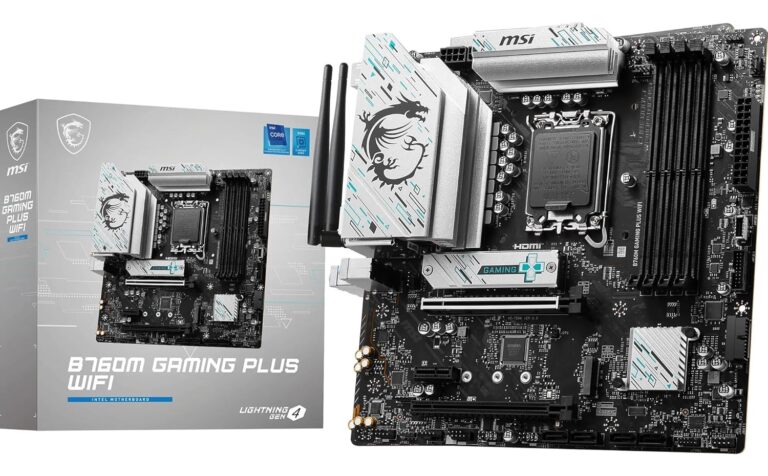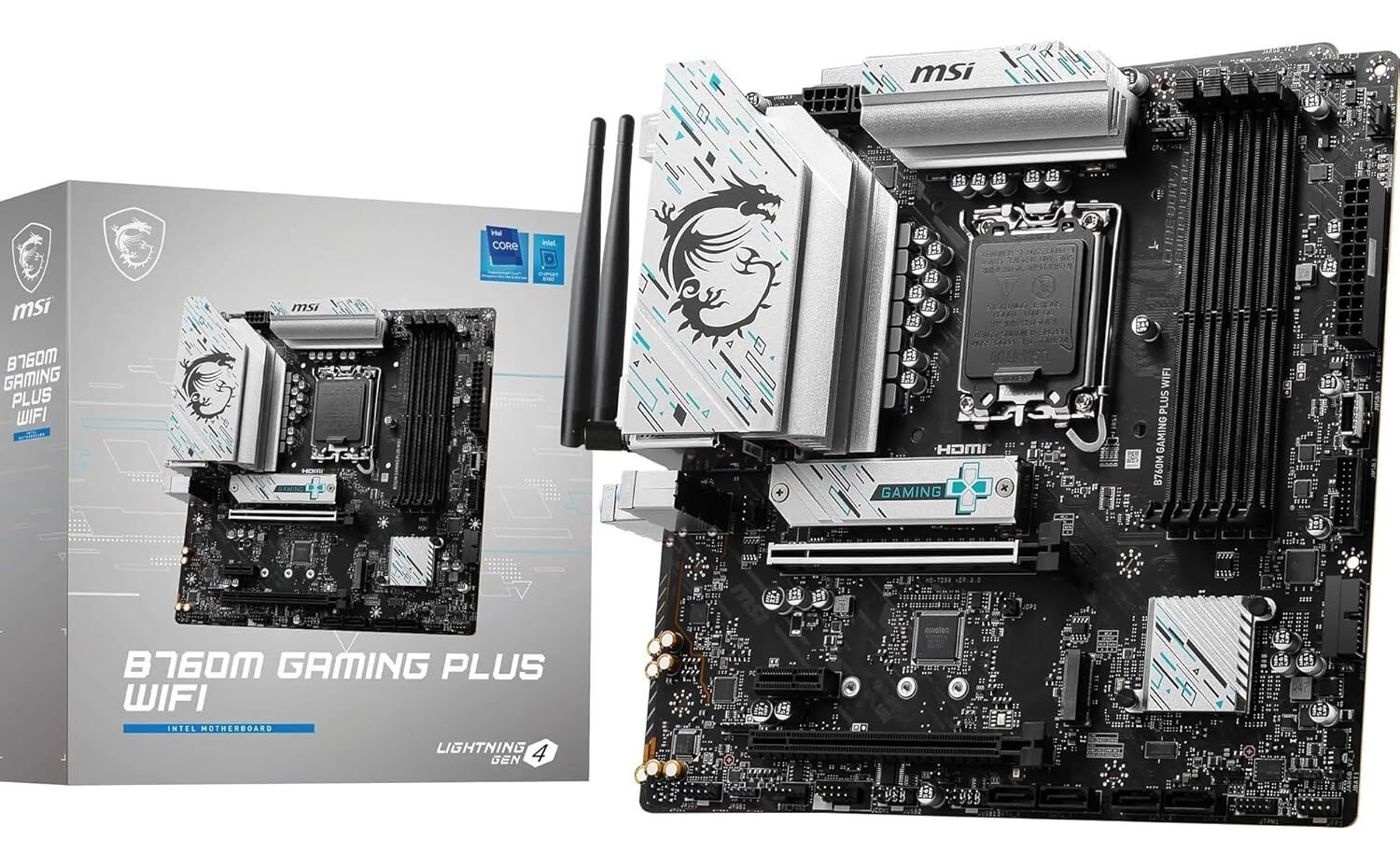
New Delhi, March 24, 2026 — Whether you’re building a new gaming rig or upgrading your existing system, choosing the right motherboard is one of the most critical decisions. The MSI B760M Gaming Plus WiFi Black motherboard is an excellent choice for gamers and creators who want the perfect balance of performance, features, and value.
This micro-ATX motherboard supports Intel’s 12th, 13th, and 14th Gen processors and comes packed with modern features like DDR5 RAM, PCIe 4.0, Wi-Fi 6E, and 2.5Gbps LAN. Let’s dive deep into every detail of this powerful motherboard.
🛒 Buy Now on Amazon India
Click here to purchase:
🔗 MSI B760M Gaming Plus WiFi Black Motherboard on Amazon India
Part 1: Processor Support and Chipset – The Heart of the Board
CPU Socket and Compatibility
The MSI B760M Gaming Plus WiFi uses the LGA 1700 socket, which supports Intel’s 12th Gen (Alder Lake), 13th Gen (Raptor Lake), and 14th Gen (Raptor Lake Refresh) Core processors. This means you have excellent upgrade flexibility—whether you’re building with a budget-friendly Core i5 or going all out with a Core i9, this board can handle it.
Chipset Features
The motherboard is built on the Intel B760 chipset, which offers:
- Support for PCIe 4.0 lanes
- Native DDR5 memory support
- Enhanced connectivity options
- Balanced feature set for mainstream users
Power Delivery System
One of the most important aspects of any motherboard is its power delivery. The B760M Gaming Plus WiFi features a robust 12+1+1 Duet Rail Power System with 75A Power Stages. This means:
- Stable power delivery even under heavy gaming loads
- Support for high-end processors without thermal throttling
- Efficient power management for better performance
The VRM setup includes high-quality components and extended heatsinks to keep temperatures under control.
Part 2: Memory Support – DDR5 Performance
RAM Specifications
| Feature | Specification |
|---|---|
| Memory Type | DDR5 |
| Slots | 4 x DIMM |
| Maximum Capacity | Up to 192 GB |
| Overclock Speed | Up to 6800+ MHz (with compatible memory) |
| Technology | Memory Boost with isolated circuitry |
Memory Boost Technology
MSI’s Memory Boost technology isolates the memory traces from other circuitry, allowing for cleaner signals and higher overclocking potential. With four DIMM slots, you can configure dual-channel memory for maximum bandwidth. The board supports high-speed DDR5 memory kits, making it ready for demanding applications and gaming.
Part 3: Expansion Slots and Graphics
PCIe Slots
| Slot Type | Quantity | Features |
|---|---|---|
| PCIe 4.0 x16 | 1 | Steel Armor reinforcement, supports graphics cards |
| PCIe 4.0 x16 (x4 mode) | 1 | Secondary expansion slot |
| PCIe 3.0 x1 | 1 | For smaller expansion cards |
The primary PCIe x16 slot features MSI Steel Armor – reinforced soldered connections that support heavy graphics cards and prevent bending. This slot runs at PCIe 4.0 x16 speed, delivering plenty of bandwidth for today’s high-end graphics cards.
Graphics Outputs
For users who plan to use integrated graphics, the motherboard offers:
- 2 x HDMI 2.1 ports – Supports 4K at 60Hz
- 2 x DisplayPort 1.4 ports – Supports high refresh rate monitors
Part 4: Storage Options – Fast and Plentiful
M.2 Slots
The B760M Gaming Plus WiFi features two M.2 Gen4 x4 slots, each offering high-speed bandwidth:
| M.2 Slot | Features |
|---|---|
| M.2 Slot 1 | PCIe 4.0 x4, includes M.2 Shield Frozr heatsink |
| M.2 Slot 2 | PCIe 4.0 x4 |
The M.2 Shield Frozr on the primary slot helps prevent thermal throttling during heavy SSD usage, keeping your NVMe drive cool even under sustained workloads.
SATA Ports
For traditional hard drives and 2.5-inch SSDs, the board provides 4 x SATA 6Gbps ports.
Total Storage Support
- 2 x M.2 NVMe SSDs (Gen4)
- 4 x SATA drives
- RAID support for SATA drives
Part 5: Connectivity – Wi-Fi 6E and 2.5G LAN
Wireless Connectivity
The motherboard comes with an Intel Wi-Fi 6E module (802.11ax) that supports:
- 6GHz band – Less interference, faster speeds
- 2.4GHz and 5GHz bands for backward compatibility
- Bluetooth 5.3 for wireless peripherals
The included Wi-Fi antenna provides excellent signal reception and can be placed on your desk for optimal coverage.
Wired Networking
For users who prefer wired connections, the board features a Realtek 2.5Gbps LAN port – five times faster than standard Gigabit Ethernet. This is perfect for:
- Gaming with low latency
- Streaming high-bitrate content
- Fast file transfers on your local network
Rear I/O Ports
| Port Type | Quantity |
|---|---|
| USB 3.2 Gen 2×2 Type-C | 1 (20Gbps) |
| USB 3.2 Gen 1 Type-A | 4 |
| USB 2.0 Type-A | 2 |
| HDMI | 2 |
| DisplayPort | 2 |
| 2.5G LAN | 1 |
| Wi-Fi Antenna Connectors | 2 |
| Audio Jacks | 3 (7.1 HD Audio) |
Internal Headers
| Header Type | Quantity |
|---|---|
| USB 3.2 Gen 1 (front panel) | 1 (supports 2 ports) |
| USB 2.0 | 2 (supports 4 ports) |
| RGB LED (4-pin 12V) | 1 |
| Addressable RGB (3-pin 5V) | 2 |
| CPU Fan | 1 |
| Pump Fan | 1 |
| System Fan | 2 |
Part 6: Cooling and Thermal Management
VRM Cooling
- Extended heatsinks covering the power delivery area
- High-quality thermal pads for efficient heat transfer
M.2 Cooling
- M.2 Shield Frozr – Dedicated heatsink for the primary M.2 slot
Fan Headers
- 1 x CPU fan header (4-pin)
- 1 x Pump fan header (4-pin) – supports water cooling pumps
- 2 x System fan headers (4-pin)
PCB Quality
The board uses a 6-layer server-grade PCB with 2 oz. thickened copper, which improves:
- Signal integrity
- Thermal dissipation
- Overall durability
Part 7: Audio and Gaming Features
Audio Solution
The motherboard uses the Realtek ALC897 Codec with 7.1-Channel High Definition Audio. MSI’s Audio Boost technology provides:
- Isolated audio circuitry to reduce interference
- High-quality audio capacitors
- Dedicated audio PCB layer
EZ Debug LED
One of the most helpful features for troubleshooting is the EZ Debug LED. Four LEDs (CPU, DRAM, VGA, BOOT) light up if there’s an issue with the corresponding component, helping you quickly identify problems during your build.
RGB Lighting Support
- 1 x 4-pin RGB LED header (12V) for traditional RGB strips
- 2 x 3-pin Addressable RGB headers (5V) for ARGB devices
You can control all lighting through MSI’s Mystic Light software.
Part 8: Complete Specifications Summary
| Category | Specification |
|---|---|
| Form Factor | Micro-ATX (24.4 cm x 24.4 cm) |
| CPU Socket | LGA 1700 |
| CPU Support | Intel 14th/13th/12th Gen Core Processors |
| Chipset | Intel B760 |
| Memory | 4 x DDR5 DIMM, up to 192GB, 6800+ MHz OC |
| Expansion Slots | 1 x PCIe 4.0 x16 (Steel Armor), 1 x PCIe 4.0 x4, 1 x PCIe 3.0 x1 |
| Storage | 2 x M.2 Gen4 x4, 4 x SATA 6Gbps |
| LAN | 2.5Gbps Ethernet |
| Wireless | Wi-Fi 6E, Bluetooth 5.3 |
| Rear USB | 1 x USB 3.2 Gen 2×2 Type-C, 4 x USB 3.2 Gen 1, 2 x USB 2.0 |
| Graphics Outputs | 2 x HDMI 2.1, 2 x DisplayPort 1.4 |
| Audio | Realtek ALC897, 7.1 HD Audio |
| Fan Headers | 1 x CPU, 1 x Pump, 2 x System |
| RGB Headers | 1 x 4-pin RGB, 2 x 3-pin ARGB |
| Warranty | 3 Years |
Part 9: Warranty Information and Check Online
MSI Warranty Overview
The MSI B760M Gaming Plus WiFi motherboard comes with a 3-year manufacturer warranty from the date of purchase. However, warranty terms can vary by region, so it’s important to verify your specific coverage.
How to Check Warranty Online
MSI provides an online system that allows users to check their product warranty status quickly and easily.
Steps to Check Warranty:
- Visit MSI’s warranty inquiry page:
🔗 https://account.msi.com/zh-Hans/services/warranty-book - Enter your product’s serial number (SN):
You can find the serial number on:- The motherboard box (label on the side)
- The motherboard itself (usually on a sticker near the 24-pin power connector or between PCIe slots)
- Complete the verification code and submit
- View warranty information:
The system will display:- Product series information
- Warranty expiration date based on actual shipping date
- Product authenticity verification
Important Warranty Notes
- Warranty terms vary by region – Always check with your local MSI office if you have questions
- Final warranty period is based on your purchase invoice (receipt), not the manufacturing date
- Register your product at MSI Member Center to simplify future service requests
Part 10: Driver Download and Installation
Official Driver Download
To get the latest drivers, BIOS updates, and utilities for your MSI B760M Gaming Plus WiFi motherboard, visit the MSI official website.
Step-by-Step Driver Download Guide
Step 1: Go to MSI Official Website
🔗 https://www.msi.com
Step 2: Navigate to Support Section
Click on “Support” in the top menu, then select “Download Center.”
Step 3: Search for Your Motherboard
Type “B760M Gaming Plus WiFi” in the search bar and select your motherboard from the results.
Step 4: Select Your Operating System
Choose Windows 10 or Windows 11 (both 64-bit) from the dropdown menu.
Step 5: Download Required Drivers
| Driver Category | Why You Need It |
|---|---|
| Chipset Driver | Core system functionality, must install first |
| LAN Driver | For 2.5Gbps Ethernet and Wi-Fi connectivity |
| Audio Driver | Realtek audio functionality |
| Intel Management Engine | System stability and power management |
| Serial IO Driver | Touchpad and GPIO functionality |
| BIOS Update | Latest firmware for CPU and memory compatibility |
Step 6: Install Drivers
- Run each downloaded file as administrator
- Follow on-screen instructions
- Restart your computer after completing installation
Alternative: MSI Driver Utility Installer
MSI also offers a driver utility tool that automatically detects your hardware and downloads the appropriate drivers. You can find this utility on the driver download page for your motherboard.
Part 11: Pros and Cons
Pros ✅
| Feature | Benefit |
|---|---|
| Strong VRM (12+1+1 75A) | Can handle even i9 processors without issues |
| DDR5 support up to 6800+ MHz | Future-proof memory compatibility |
| Wi-Fi 6E + Bluetooth 5.3 | Excellent wireless connectivity |
| 2.5G LAN | Faster than standard Gigabit Ethernet |
| M.2 Shield Frozr | Keeps NVMe SSDs cool |
| EZ Debug LED | Easy troubleshooting during build |
| 3-year warranty | Peace of mind |
| Micro-ATX form factor | Fits in smaller cases without sacrificing features |
Cons ❌
| Limitation | Impact |
|---|---|
| No PCIe 5.0 support | Can’t use next-gen GPUs at full bandwidth |
| Limited PCIe slots | Only one full-size x16 slot |
| DDR5 only | No DDR4 compatibility (requires newer, pricier RAM) |
Part 12: Who Is This Motherboard For?
Ideal For:
- Mid-range gamers building a balanced system with 13th or 14th Gen Intel processors
- Content creators who need fast storage (dual M.2 Gen4) and reliable connectivity
- Small form factor builders who prefer micro-ATX cases
- Users upgrading from older platforms to DDR5 and modern connectivity
- Budget-conscious builders who want premium features without flagship pricing
Not Ideal For:
- Extreme overclockers who need PCIe 5.0 and more robust VRMs
- Users with existing DDR4 RAM – this board requires new DDR5 memory
- Multi-GPU setups – only one full x16 slot
- Those needing 10Gb Ethernet – onboard is 2.5Gbps only
Conclusion: Is the MSI B760M Gaming Plus WiFi Worth It?
The MSI B760M Gaming Plus WiFi Black motherboard hits a sweet spot for mainstream gamers and PC builders. It offers excellent power delivery, modern connectivity (Wi-Fi 6E, 2.5G LAN, USB 3.2 Gen 2×2), and solid thermal management—all in a compact micro-ATX form factor.
Key Takeaways:
- Supports Intel 12th, 13th, and 14th Gen CPUs – great upgrade path
- DDR5 memory with 6800+ MHz overclocking – future-proof
- Wi-Fi 6E and 2.5G LAN included – no extra purchases needed
- Dual M.2 Gen4 slots with cooling – fast storage without overheating
- 3-year warranty – reliable after-sales support
If you’re building a mid-range to high-end gaming PC or a productivity workstation and want a feature-rich board without paying Z-series premiums, the MSI B760M Gaming Plus WiFi is an excellent choice.
🛒 Quick Links
| Resource | Link |
|---|---|
| Buy on Amazon India | https://amzn.to/4uIjk7r |
| Check Warranty Online | https://account.msi.com/zh-Hans/services/warranty-book |
| Download Drivers | https://www.msi.com/support/download |
| MSI Official Website | https://www.msi.com |
| Product Registration | https://account.msi.com |
Note: Specifications and prices are based on available information as of March 2026. Please verify current specifications and warranty terms with the official MSI website or authorized retailers before making a purchase.
About the Author