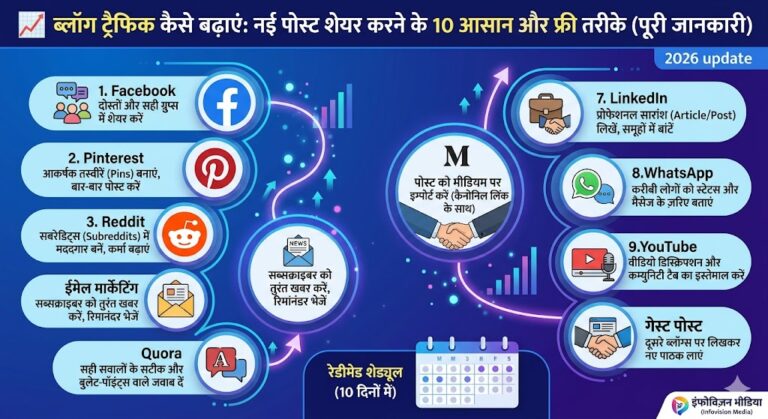

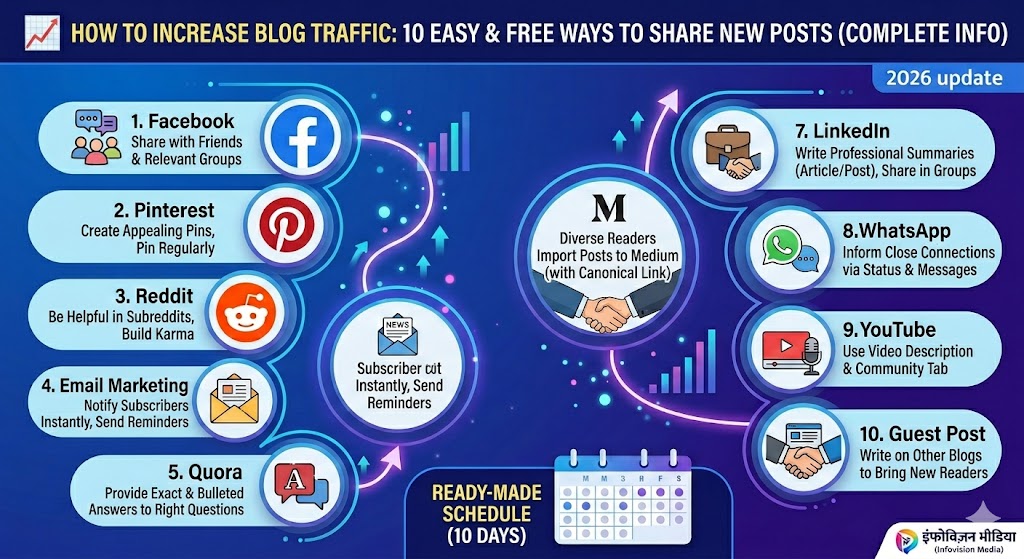
📈 How To Increase Blog Traffic: 10 Places To Share Your New Blog Post (Complete Guide)
Did you just write a great new blog post, but no one is reading it? Are you wondering how to increase blog traffic without spending any money? Then this article is for you.
Let me tell you the truth. Writing good content is not enough. You have to take your post to places where people already hang out. It is like making delicious food but keeping it in your kitchen. People will only eat it if you bring it to the market.
So let me explain how to increase blog traffic in very simple English. I will give you 10 platforms, step-by-step instructions, real examples, and even a daily schedule. No hard words. No confusion. Just action.
After reading this guide, you will know exactly where to share your new blog post and how to do it the right way.
Let us begin.
🧭 What You Will Get From This Guide
- ✅ 10 free platforms to share your blog post
- ✅ Step-by-step method for each platform
- ✅ Real life examples (what to write, what not to write)
- ✅ How many times to share (too much sharing can get you banned)
- ✅ A ready 10-day schedule to follow for every new post
1. 🟦 Facebook – Start With Your Friends And Groups
Facebook is still the biggest social platform. But posting on your own timeline does not work anymore. Facebook wants you to pay for ads. So we will use Facebook Groups to get free traffic.
📖 Real Life Example
My friend Raj has a cooking blog. He wrote a post – “How to make Maggi in 5 minutes”. He shared this post in only 5 Facebook groups where people share recipes. In 2 days, more than 3000 people visited his blog. He did not spend a single rupee.
✅ How To Do It (Step By Step)
Step 1: Search on Facebook for groups related to your topic. Type words like – “blogging help”, “content writers”, “SEO India”, or your niche words like “parenting tips”, “tech news”, “fitness india”.
Step 2: Join groups that have at least 5000 members and where people post every day.
Step 3: For the first 3 days, do NOT post your link. Only comment on other people’s posts. Write things like “Nice information”, “Well written”, “Thanks for sharing”. This makes people notice you.
Step 4: Now share your post. But do not just drop the link. Write a small caption like this:
Example (correct way):
“Hello friends, I wrote a new post – ‘How to bring traffic to your blog without money’. I think many people in this group will find it useful. Full post here: [Your Link]”
Step 5: If the group admin removes your post, do not get angry. Read their rules carefully and follow them next time.
⚠️ Dos And Don’ts
| ✅ Do | ❌ Don’t |
|---|---|
| Share in different groups on different days | Share the same link every day in the same group |
| Ask a question at the end (like “What do you think?”) | Write only “Read my new post” |
| Read group rules before sharing | Share without reading rules |
🔁 How Often To Share
- Share one new post in 3-4 different groups (on different days – morning, afternoon, evening)
- Change the caption every time
2. 📌 Pinterest – Bring Traffic With Pictures (Slow But Steady)
Pinterest is a place where people look for ideas – “how to make?”, “how to do?”, “how to write?”. If your picture is good, people will click and come to your blog. And the best part – one picture can bring traffic even after 1-2 years.
📖 Real Life Example
My friend Priya has a home decor blog. For 3 months, she uploaded 5-10 pictures every day on Pinterest. In the first month, she got only 100 visitors. But in the third month, one of her pictures went viral. Now she gets more than 2000 visitors every day – without spending any money.
✅ How To Do It (Step By Step)
Step 1: Create a Pinterest account. Choose “Business account” (it is free).
Step 2: Make one picture for your blog post. Go to Canva.com (free). Choose “Pinterest Pin” size – 1000×1500 pixels. Write big text on the picture – like “How To Increase Blog Traffic – 10 Ways”.
Step 3: Upload that picture to Pinterest. Add your blog post link. In the description, add 2-3 hashtags – #bloggingtips #trafficguide
Step 4: Upload 5 new pictures every day. If you do not have time, you can use a tool called Tailwind (paid), but in the beginning, do it manually.
⚠️ Remember
- ✅ Text on picture must be big and clear. Small font does not work.
- ✅ Make at least 3-4 different pictures for each blog post.
- ❌ Do not upload the same picture again and again.
🔁 How Often To Upload
- 5-10 pictures per new post (different designs)
- You can also re-upload old post pictures – Pinterest does not call it spam
3. 👥 Reddit – Reach Thousands Quickly (But Be Careful)
Reddit is called the front page of the internet. People here speak very directly. If you just drop your link, they will downvote you and you may get banned. But if you do it the right way, one post can bring 5000 to 10,000 visitors.
📖 Real Life Example
A blogger wrote “50 SEO tips”. He went to a subreddit called r/SEO. He did NOT drop his link. Instead, he wrote a post – “I learned SEO for 2 years. These 5 things worked the most for me” (no link). People asked questions. He answered every question. Then in one answer, he wrote – “The full list is on my blog. You can read here: [link]”. That day, 4000 people visited his blog.
✅ How To Do It (Step By Step)
Step 1: Go to Reddit.com. Create an account.
Step 2: Find subreddits (groups) related to your topic. Examples – r/Blogging, r/SEO, r/IndianBloggers, r/Technology, r/Fitness_India
Step 3: For the first 7 days, only read other people’s posts and write good comments. Do not post any link. This will increase your “Karma” (Reddit score).
Step 4: Now share your post. But do not drop direct link. Write as a question or tip. See example below:
Example (wrong way): “Read my new post: [link]” ❌ (You will get banned)
Example (correct way):
“Friends, I have been blogging for 3 years. According to me, most traffic came from 2 things:
- Google search
I wrote the full list of 10 things on my blog. If anyone wants to read: [link]” ✅
Step 5: When people comment, reply to every single one. Ignoring comments on Reddit is very bad.
⚠️ Warning
- ❌ Do not post the same link in more than 2 subreddits.
- ❌ Do not post your link every day – Reddit will call you a spammer.
- ✅ Comment on at least 10 other people’s posts before sharing your own.
🔁 How Often To Share
- Maximum 2 subreddits per new post
- Do not share your own link more than once a week
4. 💌 Email – Tell Your Closest Readers
Email is the oldest method, but it still works the best. Because people who give you their email already trust you. Facebook or Google can change their algorithms, but your email list is yours forever. No one can touch it.
📖 Real Life Example
I once sent a new post update to my email list of only 200 people. On that day, 80 people opened the email and 50 people read my blog. That is 25% traffic from just one email. And these are the most loyal readers. They read every post and also comment.
✅ How To Do It (Step By Step)
Step 1: Get an email marketing tool. Start with the free plan of Mailchimp or ConvertKit. (Mailchimp is free for up to 500 subscribers).
Step 2: Create a place on your blog where people can leave their email. Like – “Get free updates – enter your email here”.
Step 3: Whenever you write a new post, write a small email. But do not write “New post is here”. Write something like this:
Example (correct way):
“Subject: I hid this secret for 3 years – telling you todayHello [Name],
For the last 3 years, I was trying to find how to bring traffic to my blog without money. Finally, I found 10 places.
I wrote all of them in one post. If you also want to grow your blog, this post is for you:
[Link]
After reading, tell me which method you liked the most.
Thank you,
[Your Name]”
Step 4: After 2 days, send a reminder email to those who did not open. But do not send the same email. Write something new – like “Did you see this post? I think you will like it.”
🔁 How Often To Send Email
- 1 email per new post (within 1 hour of publishing)
- 1 reminder email after 2 days
- Do not send more than 2 emails per week – otherwise people will unsubscribe
5. 🔖 Quora – Write Once, Get Traffic For Years
Quora is a question-answer website. People ask questions – “How to start a blog?”, “What is SEO?”, “How to run a blog without money?”. If you write good answers to these questions, people will come to your blog. And the best part – your answer can rank on Google and bring traffic even after 2 years.
📖 Real Life Example
A blogger answered a question on Quora – “How to start blogging”. He wrote 500 words explaining the whole process. At the end, he wrote – “I wrote a detailed post on this – link here”. Even after 2 years, 50-100 people click on that link every day. He worked once and got traffic for years.
✅ How To Do It (Step By Step)
Step 1: Go to Quora.com. Create an account. In your profile, write – “Blogger at [Your Site]” and add your website link.
Step 2: Search for questions related to your topic. Like – “how to increase blog traffic”, “how to promote blog without money”.
Step 3: Choose questions that have at least 500 followers but only 1-2 answers. This means people want to see this question, but no one has given a good answer yet.
Step 4: When writing your answer, keep these points in mind:
- Write at least 300 words (yes, a little long)
- Use bullet points (•) – makes reading easy
- Use bold text for important points
Example (end of your answer):
“I wrote more deeply on this topic. If you want the full information, you can read here:
[Your Blog Post Link]”
⚠️ Remember
- ❌ Do not put your link in every answer – Quora bans such people.
- ✅ Put your link in 1 out of every 10 answers.
- ❌ Do not copy-paste the same answer again and again.
🔁 How Often To Write Answers
- Write 3-4 answers every week (put your link in only 1 of them)
- You can write answers for 5-6 different questions for the same blog post
6. 🖋️ Medium – Bring Other People’s Readers To Your Blog
Medium is a place where millions of people read articles every day. You can also put your blog post on Medium. But do not copy-paste the whole post – otherwise Google will think content is stolen. So use the “canonical link” method (explained below).
✅ How To Do It (Step By Step)
Step 1: Create an account on Medium.com.
Step 2: Go to your blog. Copy the URL of the post you want to share.
Step 3: On Medium, click “Write a story”. Then click the three dots (…) and choose “Import a story”. Paste your URL. Medium will copy your post and automatically write at the bottom – “Originally published at [Your Site]”.
Step 4: Change the post a little – change one word in the headline or add one new paragraph.
Step 5: Publish. Now Medium’s own readers can see your post.
⚠️ What Is Canonical Link?
It is a way to tell Google – “This post is originally on my website. The copy on Medium is just a repost.” This does not harm your SEO.
🔁 How Often To Post On Medium
- 1 time per new blog post (that is enough)
7. 💼 LinkedIn – Reach Professionals
If your blog is about business, marketing, jobs, technology, or self-help, then LinkedIn is a gold mine. Here you find doctors, engineers, managers, and company owners.
✅ How To Do It (Step By Step)
Step 1: Create your LinkedIn profile. In the “About” section, add your blog link.
Step 2: Click “Write an article”. Write a summary of your blog post – about 500-800 words. Never put the full post.
Step 3: At the end, write – “This was a small part of the article. Read the full post here: [Link]”
Step 4: Share this article in LinkedIn Groups. Find groups where professionals like you are present.
Example (end of LinkedIn post):
“…and this is how I brought 10,000 visitors to my blog. I wrote the full process on my blog. If you also want to grow your blog, you can read here:
[Link]”
🔁 How Often To Share
- 1 LinkedIn article + 1 LinkedIn post per new blog post
8. 📱 WhatsApp – Tell Your Close Contacts
Spamming on WhatsApp is very easy, but if you do it the wrong way, people will block you. The correct way is to message only those people who already know you or are interested in your topic.
✅ How To Do It (Step By Step)
Step 1: Create a separate “WhatsApp Business” account (it is free). Here you can write your blog name and link in your profile.
Step 2: Make a list of friends and contacts who might read your blog. Send them a personal message:
Example (personal message):
“Hello [Name], how are you? I wrote a new post – ‘How to bring traffic to your blog without money’. I thought you might like it because you also do blogging. Here is the link: [Link]”
Step 3: Post on your WhatsApp Status (once a day) with an attractive picture that says – “New post: [Title] – link below 👇”.
❌ What Not To Do
- Do not drop links in groups where it is not allowed.
- Do not send personal messages to more than 3-4 people per day – that is spam.
- Do not drop a link without saying “Hello” or starting a conversation.
🔁 How Often To Share
- 1 status + 10-15 personal messages per new post (only to people you talk to)
9. 🎬 YouTube – If You Also Make Videos
If you have a YouTube channel (or are planning to make one), you can bring traffic from your videos to your blog. After 500 subscribers, YouTube opens the “Community Tab” – you can post links there.
✅ How To Do It (Step By Step)
Step 1: In your YouTube video description box, add your blog post link. Put the link in the first 2 lines because only those are visible without clicking “show more”.
Step 2: If you have 500+ subscribers, go to the Community Tab. Write a post there:
Example:
“📢 New blog post: ‘How to increase blog traffic without money’ – if you want to deep dive, read here: [Link]”
Step 3: In the middle of your video (like at 3 minutes), say – “I wrote a detailed article on this topic on my blog. Link is in the description below.”
🔁 How Often To Share
- 1 time per new blog post (in video description) + 1 time (in Community Tab)
10. 🤝 Guest Post – Write On Other Blogs To Grow Your Traffic
This method is a little hard, but it gives the most benefit. You write a free post for another blogger’s site, and in return, you get a link to your site. Two benefits – first, that blog’s readers come to you. Second, Google gets a good link (SEO improves).
✅ How To Do It (Step By Step)
Step 1: Search on Google – “Write for us + blog” or “Guest post + your niche” (like “guest post + blogging” or “write for us + digital marketing”).
Step 2: Make a list of sites that write on the same topic as you.
Step 3: Write them an email:
Example (email):
“Subject: Guest post proposal – [Your Site Name]Hello [Blog Name],
I am [Your Name], a blogger at [Your Site]. I am a reader of your site and I really liked your post [Post Name].
I want to write a guest post for you. My 3 ideas are:
- [First topic]
- [Second topic]
- [Third topic]
Would you allow me to write on any of these?
Thank you,
[Your Name]”
Step 4: When they say yes, write the post according to their rules. In your author bio (about the writer), add your blog link.
🔁 How Often To Do
- 2-3 guest posts per month (more than that looks like spam)
📅 Ready 10-Day Schedule (10 Places In 10 Days)
Here is a time table. If you follow this, every new post will reach 10 places in 10 days:
| Day | What To Do | Time Needed |
|---|---|---|
| Day 1 (9 AM) | Publish your post. Send email to your list immediately. | 15 minutes |
| Day 1 (5 PM) | Share in 2 Facebook groups. Update WhatsApp Status. | 20 minutes |
| Day 2 | Share in 1 subreddit on Reddit. Post on LinkedIn. | 20 minutes |
| Day 3 | Write 2 answers on Quora. | 30 minutes |
| Day 4 | Upload 5 pins on Pinterest. | 30 minutes |
| Day 5 | Import to Medium. Share in LinkedIn Groups. | 15 minutes |
| Day 6 | Share in another Facebook group (different caption). | 10 minutes |
| Day 7 | Write 2 more answers on Quora. | 30 minutes |
| Day 8 | Upload 5 more pins on Pinterest (new pictures). | 30 minutes |
| Day 9 | Send WhatsApp messages to friends who blog. | 15 minutes |
| Day 10 | Write 1 email for a guest post (or follow up on old pitch). | 20 minutes |
🧠 Final Words – Now You Know How To Increase Blog Traffic
So friends, now you have 10 methods – in very simple English. Now you only have to do one thing – start today.
Pick any one method (like Facebook groups) and do it for 7 days continuously. Then add the next method. Do not try to do everything at once – you will get tired and quit.
Remember:
- ✅ Traffic does not come overnight – it takes at least 1 month.
- ✅ Every platform has its own rules – read them and follow them.
- ✅ Do not just drop links and sit – talk to people, answer their questions.
- ✅ If one method does not work, leave it and try another.
Now it is your turn. Comment below – which method will you try first? And if you have already tried any, tell me how much traffic you got.
Wish you good luck and may your blog always grow! 🙏
✍️ Author: Raj H. Goswami (Infovision Media)
🔗 Website: www.infovisionmedia.com – Easy place to learn blogging and digital marketing in simple English.
📌 Read next: “What Is SEO – Beginner’s Guide” – coming soon.
About The Author